Manage outbound call routing
Outbound call routing rules govern the way external calls are handled, based on caller ID or called number match rules.
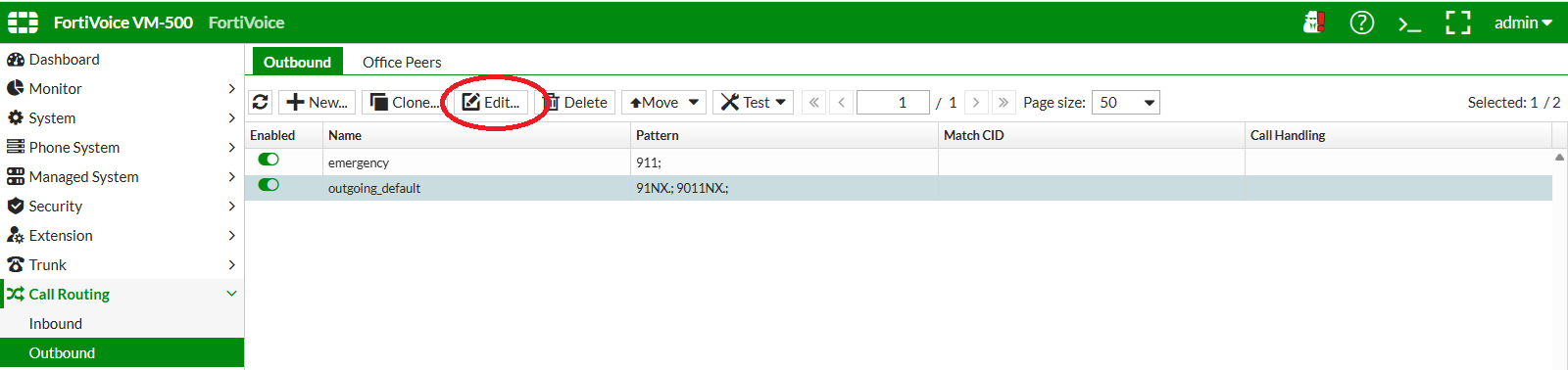
On the FortiVoice web administration page, select Call routing and Outbound on the left-hand menu.
Select the Outbound tab to manage outbound call routing rules.
Select the outgoing_default rule and click the Edit button to edit the outbound call routing rule.
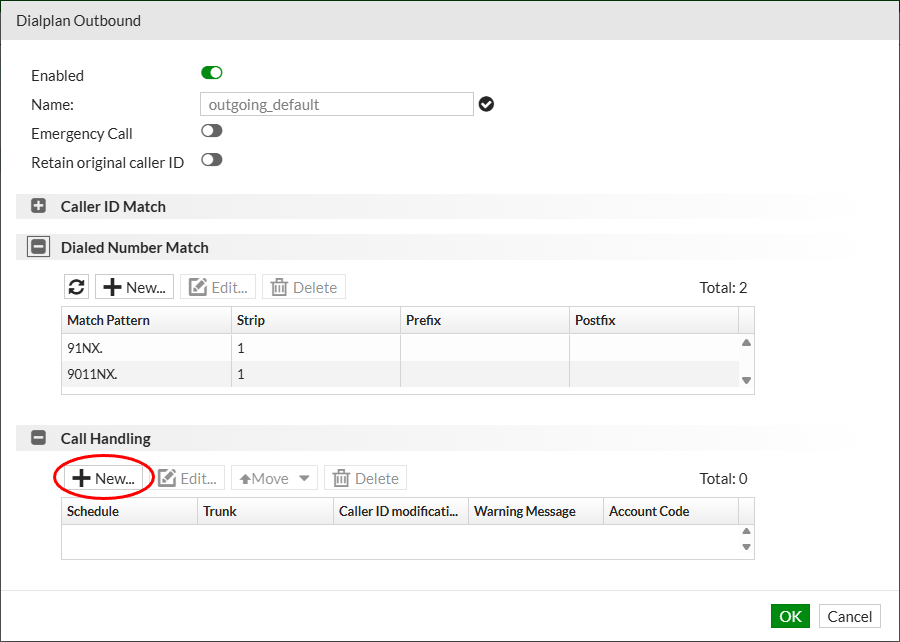
Several Dialed Number Match rules already exist.
They define when the outbound call routing rule is triggered.
For instance, when a user dials 91 followed by any digits, this rule is matched.
These matching rules are written using matching patterns.
Tip
Matching patterns:
| Pattern | Description |
|---|---|
| X | Matches any single digit from 0 to 9 |
| Z | Matches any single digit from 1 to 9 |
| N | Matches any single digit from 2 to 9 |
| [ ] | Matches any digit in the brackets. For a range of numbers, use a dash. |
| . (period) | Acts as a wildcard that matches any digit and allows for any number of digits to be dialed. |
| ! (exclamation mark) | Acts as a wildcard that matches any digit (including no digits) and allows for any number of digits to be dialed. |
Some examples:
| Pattern | Description |
|---|---|
| X. | Matches any dialed number. |
| NXXXXXX | Matches any seven-digit number, if the first digit is 2 or higher. |
| 9[135-7] | Matches 91, 93, 95, 96, 97 (note the – allowing a range of digits). |
| 1NXXNXXXXXX | Matches any dialed number that matches this pattern: 1 + area code (between 200 and 999) + seven-digit number (first digit is 2 or higher) |
| 011. | Matches any number that starts with 011 and has at least one more digit. |
| XX! | Matches any two or more digits. |
Several actions can be associated with matching rules:
- Strip: Delete digits from the left of the dialed number
- Prefix: Add digits to the left of the dialed number
- Postfix: Add digits to the right of the dialed number
Info
The following default match patterns are used in this lab:
- 91NX. : Matches US numbers
- 9011NX. : Matches international numbers
For both match patterns, the first digit (9) is stripped before the number is sent to the SIP provider.
Using these patterns, a user dials 9 1 XXX XXX XXXX to call a US number.
Once a dialed number is matched, FortiVoice needs to know which trunk to use to place the call. This is managed in the Call Handling section.
Click the New button in the Call Handling section to add an outbound trunk for this outbound call routing rule.
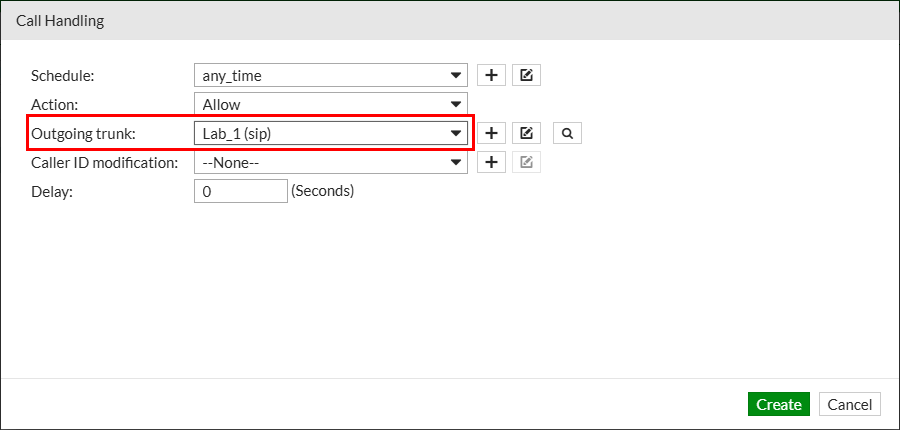
Complete the following fields to add a new call handling for the outbound call routing rule (replace NN with your assigned two-digit lab number):
- Schedule: select
any_time - Action: select
Allow - Outgoing trunk: select
LAB_NN (sip)
Click the OK button at the bottom of the page to add the new call handling.
Click the OK button to update the outbound call routing rule.
Repeat the same steps for the emergency outbound call routing rule, using the same LAB_NN SIP trunk for the outbound call routing rule call handling.